


Picture a single unbroken shot: a chef’s knife rocking through coriander, the camera drifting closer until her hands fill the frame, the background dissolving into warm bokeh. That’s the kind of shot every director wants from AI video generation, yet most people typing into Seedance get a jittery, disoriented mess instead. The surprising bit is that the fix has nothing to do with the model’s raw capability and everything to do with vocabulary – the same plain-language camera terms cinematographers have used since the dolly track was invented. Learning to write proper seedance camera movement prompts is less like coding and more like directing a first assistant camera operator: name the move, the direction, the speed, the subject, and the frame you want preserved, and the machine tends to listen.
That’s the reframe worth sitting with. AI video generation isn’t a slot machine you keep pulling until something usable falls out – it’s a directing exercise, and directing has a grammar. This guide breaks that grammar down shot by shot, so you can stop guessing and start composing.
Prerequisites
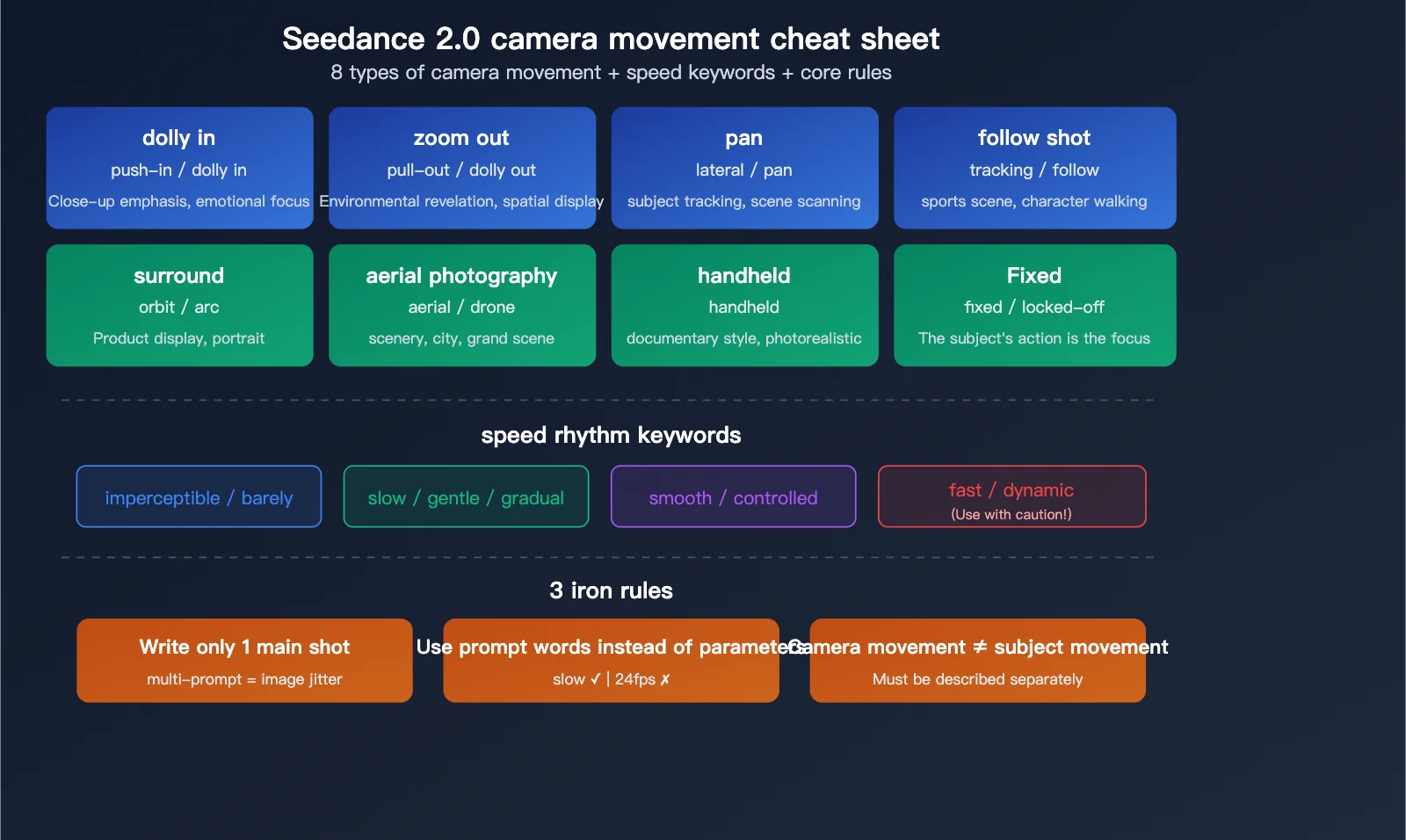
Image: Apiyi.com (help.apiyi.com)
Before writing a single prompt, get familiar with three things.
First, know your terms. Pan, tilt, dolly, truck, pedestal, orbit, crane, handheld and static shot are standard filmmaking vocabulary, not secret Seedance codes. According to seedance2-video.com, the only movement control that actually exists as a visible toggle in the Seedance2Video interface is “Camera fixed” – everything else is interpreted from your written description, the way a camera operator interprets a director’s shorthand on set. We couldn’t locate a public Seedance API or model card from ByteDance itself enumerating camera parameters directly, so treat every “reliable combination” in this guide as field-tested community knowledge rather than a documented spec – useful, but worth verifying against your own test renders before you build a whole shoot around it.
Second, decide whether you’re working text-to-video or image-to-video, because the two need different camera wording entirely. A T2V prompt has to build the whole world from nothing – scene geometry, subject position, movement path and framing all need spelling out. An I2V prompt inherits a composition that already exists, so your job shifts to describing camera motion relative to what’s already visible, without contradicting the angle, the crop, or what’s hiding just outside frame.
Third, have your shot list ready in your head, even if it’s just one sentence per shot. Directors storyboard for a reason: it forces clarity before the camera rolls, real or synthetic. If you’re working from a phone, this is also the moment to think about your source frame – shoot your reference image or plate in good, even light, because Seedance will happily animate a badly lit still into a badly lit clip.
Step 1: Learn the prompt word order that actually works
The most reliable structure follows a fixed sequence: movement, then direction, then speed, then subject relationship, then framing constraint.
A prompt like “Slow dolly in toward the chef, keeping a medium close-up and the hands visible” hits every one of those beats in order. Notice how each word is doing a distinct job – “slow” sets pace, “in” sets direction, “toward the chef” anchors the subject, and “medium close-up… hands visible” locks the framing so the model doesn’t drift into an unintended wide shot halfway through. This is the same discipline a cinematographer uses when calling a shot on set: vague instructions produce vague coverage, and specific instructions produce a specific, reproducible result.
Before: “Camera moves closer to the chef.” Loose verb, no pace, no framing lock – expect the crop to wander and the focal point to hunt around mid-clip.
After: “Slow dolly in toward the chef, keeping a medium close-up and the hands visible.” Same idea, but every job in the sentence is assigned – expect a steady push with the hands anchored in frame throughout.
Step 2: Understand why zoom and dolly aren’t interchangeable
Zoom changes your lens’s focal length with almost no shift in camera position, while a dolly physically moves the camera through space, which changes how foreground and background relate to each other.
This is one of the oldest lessons in cinematography, immortalised by Hitchcock’s contra-zoom in Vertigo – dollying back while zooming in, so the background stretches away while the subject stays locked in frame. Wikipedia’s entry on the dolly zoom remains the more authoritative technical breakdown of why the two produce such different psychological effects: zoom flattens space, dolly reveals it. When you write “zoom in” in a prompt, you’re asking for a magnification effect with a static vantage point. When you write “dolly in,” you’re asking the camera itself to travel, which shifts parallax between near and far elements – the kind of subtle depth cue that makes a shot feel physically inhabited rather than digitally cropped. Choose the word that matches the feeling you actually want: zoom for urgency and flattening, dolly for immersion and dimensionality.
If you’re prototyping on a phone before committing to a generation, physically walk the camera towards your subject rather than pinching to zoom – that short bit of handheld reference footage is often enough to remind you which sensation you’re actually chasing, and it’s a habit borrowed straight from how documentary shooters like the Maysles brothers worked: move the body, not the lens.
Step 3: Stick to one movement per shot
One clean movement per shot is almost always easier for the model to interpret correctly than a stack of camera verbs competing for control.
Think of it like conducting an orchestra with a single clear downbeat rather than four competing tempos at once. If a scene genuinely needs two movements – say, a truck right that settles into a slow push in – sequence them explicitly rather than describing them as simultaneous. Write it as two beats: “Truck right following the subject, then transition to a slow dolly in as she stops.” This mirrors how films are actually cut; even complex-looking oners are frequently a sequence of distinct, well-defined moves rather than four things happening at once, the way Emmanuel Lubezki’s long takes in Children of Men are really several choreographed beats disguised as one continuous breath.
Step 4: Use combinations that are known to work
Some movement-and-framing pairings are dependable because they mirror how camera rigs behave physically. According to seedance2-video.com, reliable combinations include a slow dolly in with a medium close-up, a truck right paired with a subject walking right, a pedestal up held in full-body framing, a slow orbit around a static product, and a crane down opening into a wide establishing shot. Treat these as a well-tested starting list rather than gospel – the source is a practitioner’s field guide, not a Seedance-published spec, so a quick test render before a paid production run is cheap insurance.
Each of these works because the camera logic and the framing logic reinforce each other rather than fight, and each maps to a real analogue you can rehearse before you ever open a prompt box:
- Slow dolly in, medium close-up. Prompt: “Slow dolly in toward the barista, keeping a medium close-up and her hands on the portafilter.” Expected result: a steady, intimate push with the hands staying anchored. Common failure: framing creeps to a wide shot if you drop the “keeping a…” clause. Analogue: walking three slow steps towards someone mid-sentence, phone held at chest height, no pinch-zoom.
- Truck right, subject walking right. Prompt: “Truck right, camera moving parallel to the subject as she walks along the market stalls, wide shot.” Expected result: a smooth lateral glide that keeps pace with the walker, background sliding past in parallax. Common failure: if the subject’s direction contradicts the truck direction, the model tends to produce a jump-cut-like stutter. Analogue: a dolly track laid alongside a moving subject, or on a phone, a gimbal set to follow mode.
- Pedestal up, full-body framing. Prompt: “Pedestal up from the dancer’s feet to a full-body wide shot as she rises onto pointe.” Expected result: a vertical reveal that reads as a rise, not a crop. Common failure: cropping to a close-up strips the pedestal move of meaning entirely – it just reads as a zoom. Analogue: raising a tripod centre column steadily, eyes on the horizon line to check for drift.
- Slow orbit, static subject. Prompt: “Slow orbit around the ceramic vase, subject perfectly still, soft window light from camera left.” Expected result: a smooth 360-degree reveal of form. Common failure: any subject movement fights the orbit and reads as wobble rather than intentional motion. Analogue: a lazy Susan under the product with the phone fixed on a mini tripod – the cheapest orbit rig there is.
- Crane down, wide establishing shot. Prompt: “Crane down from rooftops into a wide establishing shot of the street market at dusk, golden hour light.” Expected result: a descending reveal that establishes geography before narrowing focus. Common failure: pairing this with a tight framing constraint defeats the purpose – crane moves need room to breathe. Analogue: the opening descent shots Gordon Willis favoured in The Godfather, camera easing down from an omniscient vantage into the human scale of the scene.
Step 5: Avoid the combinations that reliably fail
Certain pairings are contradictions dressed up as instructions, and the model has no way to resolve them sensibly. A static shot combined with rapid orbit, a pan left and pan right described as simultaneous, or handheld movement paired with a locked camera are all internally inconsistent.
This is where most failed generations originate. Two of the most common failure patterns are vague prompting – something like “Cinematic camera, dynamic movement,” which gives no direction, speed, path, subject or framing to latch onto – and overloaded prompting, which stacks four or more movements into a single shot description. The repair for both is the same: strip the prompt back to one concrete movement with real parameters, or split an ambitious shot into two sequential prompts rather than one impossible one.
Lighting and colour matter as much as movement
A technically flawless camera move still falls flat if the light and colour underneath it are muddy, so build lighting language into your prompt the same way you build camera language. Naming a quality of light does real work: “soft window light from camera left” reads completely differently to the model than “harsh overhead light casting hard shadows,” and the difference shows up in how convincingly the subject sits inside the frame. Borrow from the three-point setups still taught in every basic lighting course – key, fill, backlight – even when you’re describing a single static product shot; naming a rim light or a bounce card in your prompt gives the model a physical logic to follow rather than an abstract mood.
Colour deserves the same specificity. “Golden hour” and “blue hour” aren’t just pretty phrases, they’re precise colour-temperature instructions, roughly 3000K warmth against 8000K cool, and naming them steers the whole palette of a generation the way a colourist would grade a scene in post. Think of Roger Deakins’ work on 1917 – warm, low, motivated light doing as much storytelling as any camera move – or the desaturated teal-and-orange grading that’s become shorthand for “contemporary blockbuster.” Pick a reference deliberately rather than defaulting to whatever the model gives you, and mention it by name if it helps: “warm, Deakins-style low sun” carries more information than “nice lighting.”
For workflow, phone shooters have an advantage here that’s easy to overlook: shoot your source stills or reference plates during the golden hour itself when you can, because no amount of prompt language fully rescues a flat, midday-lit source image feeding into an I2V generation. If you’re editing the output afterwards, a basic pass in DaVinci Resolve’s free tier or even CapCut on a phone – lifting shadows slightly, warming the white balance, adding a touch of grain – does more to sell the “shot on a real camera” feeling than any extra prompt complexity would.
Troubleshooting
The camera drifts somewhere unintended. This almost always traces back to a missing framing constraint. Add the “keeping a [shot type]” clause explicitly rather than assuming the model will hold your intended crop.
The movement looks flat or unconvincing. Check whether you asked for a zoom when you meant a dolly, or vice versa. If you want the sense of the camera travelling through the scene, dolly language is doing the work; zoom language will always read as thinner and less dimensional.
Nothing in the shot moves the way you described. Look for contradictions – a locked-off instruction paired with a handheld one, or two directions given as simultaneous. Rewrite as a single clean movement, or sequence competing moves as separate steps.
Where to go from here
Once single-movement shots feel reliable, start building short sequences – three or four prompts chained together the way a scene is actually cut, rather than one shot trying to do everything. Study a few minutes of a film you admire and describe its camera moves in this same plain vocabulary before you ever open a prompt box; the translation gets easier every time. Come back to that opening image of the chef’s knife and the drifting camera – that shot is achievable the moment you can name, in order, exactly what the camera is doing and why.
Frequently Asked Questions
Q: What is the correct word order for a Seedance camera movement prompt?
A: The most effective order is movement, direction, speed, subject relationship, then framing constraint – for example, “Slow dolly in toward the chef, keeping a medium close-up and the hands visible.”
Q: What’s the difference between zoom and dolly in a video prompt?
A: Zoom changes focal length with little shift in camera position, producing a flatter effect, while a dolly physically moves the camera, changing the parallax between foreground and background for a more three-dimensional feel.
Q: Should I combine multiple camera movements in one Seedance prompt?
A: Generally no – one movement per shot is easier for the model to interpret correctly, and if two movements are essential they should be described as a sequence rather than simultaneous.
Q: Does Seedance have dedicated controls for pan, tilt, dolly and orbit?
A: No – these are standard filmmaking terms used inside written prompts rather than guaranteed interface parameters; the Seedance2Video interface only exposes a “Camera fixed” toggle as a distinct control, and this is based on a practitioner source rather than official ByteDance documentation, so it’s worth confirming against the current interface yourself.
Q: Do text-to-video and image-to-video prompts need different camera wording?
A: Yes – text-to-video prompts must establish scene geometry, subject position and movement path from scratch, while image-to-video prompts must describe motion relative to the existing composition without contradicting its visible angle or crop.
Source: https://seedance2-video.com/seedance-camera-movement-prompts
This article was researched and written with AI assistance, then reviewed for accuracy and quality. Talulah at Its.That. uses AI tools to help produce content faster while maintaining editorial standards.