Last updated: April 4, 2026
Image: Pictomic
Picture this: a single trainer rotates on a motorised turntable. No hands touch it. The camera fires automatically at every five degrees of rotation. Seventy-two frames later, the software stitches them into an interactive spin that a shopper can drag with their thumb at 3am. The photographer is in the kitchen making coffee.
Is this the future of product photography – or is it already Tuesday?
In 2026, the 360 product photography workflow has crossed a threshold. Automation has moved from aspirational to operational, and the studios that understand this shift are out-competing those that don’t on both speed and output quality. Here is how we got here, what the turning point looks like in practice, and what it means for anyone shooting product in a studio today.
How the 360 Product Photography Workflow Became Automated
Image: Pictomic
For most of its history, 360-degree product photography was a craft of patience and manual discipline. You’d set your turntable to rotate a fixed increment, fire the shutter by hand or with a wired remote, check the histogram, nudge the aperture, repeat. Seventy-two shots for a full spin meant seventy-two individual moments where something could go wrong – a hand in frame, a focus drift, a white balance shift between shots two and fifty.
The early turntable systems of the 2010s solved the rotation problem. Motorised decks standardised the increments and removed the operator’s hands from the equation. But the camera still lived in its own world. Exposure, focus, shutter speed – those settings sat on a physical dial on the camera body, divorced from the software driving the turntable.
What changed was integration. When camera manufacturers opened their tethering protocols, software developers built bridges. Pictomic’s Visere Captura grew from a turntable controller into a fuller capture environment – with recent versions adding expanded Nikon Z and Canon support and integrated WebP output. The direction is clear: camera control, turntable automation, and output formatting increasingly speaking one language from inside a single interface.
Think of it like the difference between a mixing desk where every fader has its own knob you must physically reach for, versus a DAW where every parameter in the signal chain is addressable from one screen. The outcome is the same audio. The process is unrecognisable.
Software Automation Is Changing What a Shoot Actually Looks Like
The core revelation of 2026 is this: the most significant improvements to 360-degree capture quality are no longer coming from optics or sensors – they are coming from workflow software.
The direction across leading capture platforms is toward hands-off studio capture, where a workflow fires, runs, and delivers frames with minimal operator intervention. Set the parameters, press go, walk away. For studios producing dozens of SKUs a day, this is not a luxury. It is the only viable model.
This matters for image quality in a counterintuitive way. Fatigue is the enemy of consistency. When a photographer adjusts settings manually across hundreds of frames, micro-variations creep in. Lighting temperature drifts with ambient heat. Focus hunting occurs between shots. Automated camera control eliminates these variables not by being more skilled than a photographer, but by being incapable of having a bad afternoon.
Adobe has applied the same logic to design. The Turntable feature in Adobe Illustrator generates multiple editable 3D-view angles from a single 2D vector artwork, removing the need to manually redraw every perspective. What capture software does for physical product photography, Illustrator’s Turntable does for graphic assets. Automated multi-angle generation is now a design workflow expectation, not a photographic novelty. If you’re building visual content across formats, this connects directly to work we’ve explored in Top 18 Motion Graphics Video Examples (2026 Edition) – the appetite for dynamic, rotatable visual assets runs through every content format right now.
Building a Beginner 360 Studio: A Practical Setup
Before automation can do its job, the foundations need to be right. Here is how we’d build a functional 360 studio from scratch.
Step 1 – Choose your frame count. Start with 36 frames per rotation (10-degree increments) for most small products. Move to 72 frames (5-degree increments) for footwear, bags, or anything with complex surface detail. More frames mean smoother interactive spins, but 36 is more than adequate for furniture, apparel, and general retail SKUs. Products with fine surface texture – jewellery, electronics, embossed packaging – benefit from 72 or a supplementary macro pass.
Step 2 – Set your camera settings for consistency. The single most important rule in 360 capture is that every frame must match. Use full manual mode and lock everything down before the turntable moves.
- Aperture: f/8 to f/11. This gives you enough depth of field to keep front-to-back product sharpness across a full rotation without diffraction softening your fine detail. Wide apertures like f/2.8 introduce focus plane variation between frames that post-processing cannot fix.
- Shutter speed: 1/125s or faster to eliminate any motion blur from the turntable mechanism. If you’re shooting with flash, sync to your flash duration – typically 1/200s or your camera’s sync speed limit.
- ISO: 100 or 200. Keep it as low as possible. Noise in 360 frames is cumulative – it reads as visual inconsistency across the spin, not just grain in a single shot.
- White balance: Set a custom Kelvin value to match your lights – typically 5500K for daylight-balanced LEDs. Never use Auto White Balance. A single-degree shift between frames creates visible colour flicker in the finished spin, and no amount of post-correction fully removes it.
Step 3 – Choose your lens. A focal length in the 50mm to 100mm range (full-frame equivalent) minimises perspective distortion across the rotation. Wide-angle lenses stretch the product at the edges of each frame, producing a warping effect in the spin that reads as amateur. A 50mm or 85mm prime is ideal for most products. For detail passes on small items, a macro lens or close-up filter at the same focal length keeps the working distance manageable.
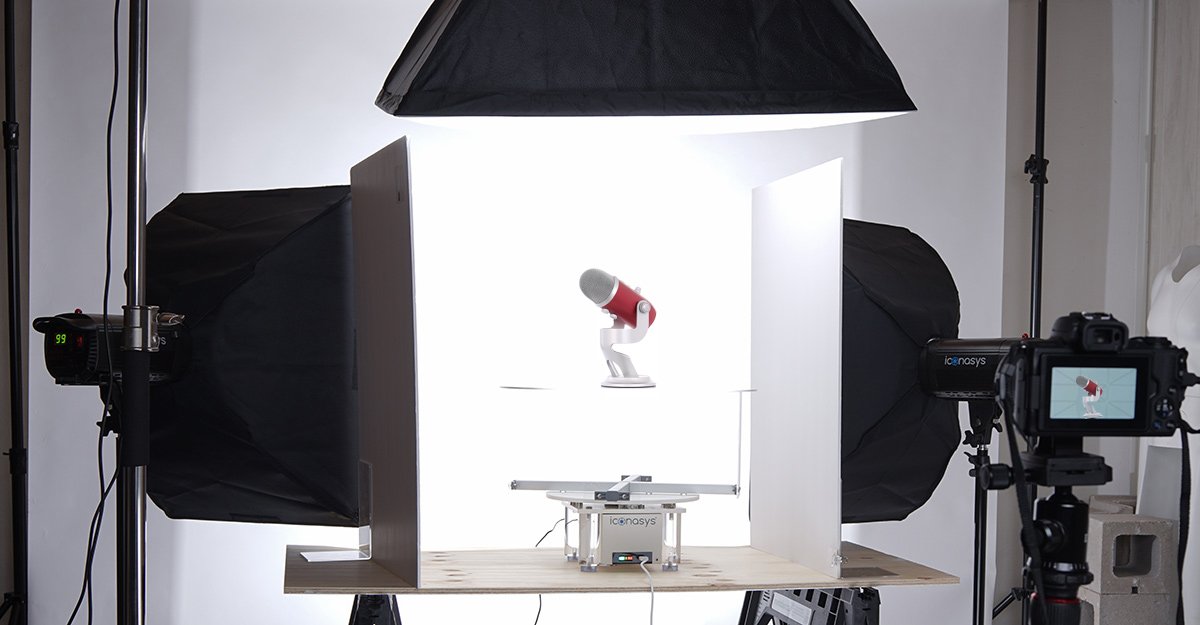
Step 4 – Position your lighting. The simplest consistent setup is a light box with diffused LED panels on all sides – this wraps the product evenly and eliminates hard shadows that shift position as the product rotates. If you’re building a custom rig, a three-light setup works well: a key light at roughly 45 degrees to the front-left of the turntable, a fill light at half the key’s output opposite it to open up shadows without flattening form, and a hair or rim light behind the product to separate it from the background. The rim light is what gives a white product on a white background its readable edge.
Colour temperature consistency between all lights is non-negotiable. Mixing daylight-balanced LEDs with tungsten or fluorescent panels creates colour casts that vary across the rotation because the mix ratio changes as the product faces different angles. Match your sources.
Step 5 – Phone shooters: the accessible route. A modern phone camera locked to its manual mode equivalent (using an app like Moment or ProCamera) can absolutely produce commercial-quality 360 results under controlled lighting. Lock exposure manually, set a fixed white balance, and use a tripod mount to hold a consistent distance from the turntable. The aperture on a phone lens is fixed, so lighting quality matters even more – a proper light box levels the playing field significantly. Research consistently shows that 360-spin experiences can increase conversion rates substantially compared to static imagery, and the barrier to producing them is lower than most photographers assume.
For hardware at an accessible entry point, a motorised turntable from Pictomic’s Silver series or comparable alternatives paired with a light box and LED kit is a proven combination. The Platinum series and heavier commercial solutions are suited to large or high-mass products where positional accuracy across all frames is critical.
Post Workflow: From Frames to Finished Spin
Capture is half the job. Here is a clean post workflow that keeps things efficient.
First, cull for technical failures only – out-of-focus frames, significant motion blur, any frame where the product shifted on the turntable. Do not cull for colour or exposure at this stage.
Then colour-match across all frames using your preferred tool. Capture One’s batch colour grading tools, Adobe Lightroom’s synchronise settings, or dedicated turntable software with built-in batch export all work. The goal is perceptual neutrality – you want the product’s colour to look as it would in person under good light, not stylised. Our 2016 Cinema Look: Complete Colour Grading Guide for 2026 covers the distinction between a lifestyle grade and a product-neutral grade, and why the difference matters for purchase confidence.
Export as WebP for web delivery – it offers the best file size at acceptable quality for spin viewer formats. Name your files with consistent sequential numbering before importing into your spin viewer or e-commerce platform. Background replacement, if needed, is easiest applied as a batch mask at this stage rather than frame by frame.
What This Means for Studios – and Photographers Just Starting Out
The automation wave does not make photographic judgement obsolete. It relocates it.
Experienced photographers are no longer spending their attention on routine frame-to-frame consistency checks. They are spending it on the decisions that software cannot make: how to light a transparent glass bottle so the rim catches brilliance without blowing out, how to angle a textile product so the weave reads correctly, how to construct a colour palette that serves the brand’s visual identity across every angle of rotation. These are craft decisions. They are also the decisions that separate adequate product photography from the kind that sells.
For beginners entering the 360 product photography workflow now, the learning curve looks different than it did five years ago. Understanding the software stack is as important as understanding exposure. A grasp of colour grading – knowing why you’d apply a warm grade to lifestyle images but keep product shots perceptually neutral – becomes essential. The grading principles that carry across both video and still product work apply directly to post-processing 360-spin frames for consistency.
The practical starting point for anyone building this capability: invest in turntable automation first, then software integration, then lighting quality. A phone camera shooting tethered on a motorised deck with consistent LED output will outperform a full-frame mirrorless fired manually under variable ambient light every single time. Consistency compounds. Sixty-four sharp, matched frames from a mid-range sensor tell a cleaner product story than seventy-two frames that vary by half a stop. If flat-lay and single-angle product work is your starting point, ProductAI’s clothing flat-lay photography guide covers the compositional principles that translate directly into strong 360 setups.
Back to the trainer on the turntable. The photographer returns from the kitchen. The shoot is complete. Seventy-two frames sit in the output folder, formatted as WebP, colour-matched, ready for review. What remains is the editorial eye – is this the right background tone? Does this lighting treatment serve the product’s character? Should we add a macro pass on the sole detail?
Those questions matter more now, not less. Automation has cleared the repetitive work from the desk so we can give our full attention to them.
Frequently Asked Questions
Q: What is a 360 product photography workflow?
A: A 360 product photography workflow is the end-to-end process of capturing a full rotation of a product – typically 36 to 72 frames – using a motorised turntable, then processing and delivering those frames as an interactive spin asset. Modern workflows integrate camera control, turntable automation, and output formatting into a single software environment.
Q: How many frames do I need for a 360 product spin?
A: 36 frames (10-degree increments) is a solid starting point for most products and produces a smooth interactive spin. 72 frames (5-degree increments) is the standard for premium e-commerce, footwear, and any product with significant surface detail. More frames mean smoother dragging and less interpolation artefact in the viewer.
Q: What camera settings should I use for 360 product photography?
A: Shoot in full manual mode. A good starting point is f/8 to f/11 for depth of field, 1/125s or faster to eliminate motion blur, ISO 100 or 200 for clean shadows, and a fixed Kelvin white balance matched to your lights. Lock all settings before the first frame fires and do not change them mid-shoot.
Q: Do I need professional camera equipment to start 360 product photography?
A: No. A phone camera shooting under consistent, diffused LED lighting on a motorised turntable will produce better results than a professional camera fired inconsistently under variable light. Use a manual camera app to lock exposure and white balance. Consistency across all frames matters more than peak sensor resolution, especially at the start.
Q: What does Visere Captura Pro offer over the standard version?
A: Visere Captura Pro includes advanced camera control features that allow photographers to adjust camera settings from within the software rather than at the camera body – including expanded Nikon Z and Canon support in version 5.0. This reduces the need for manual adjustment between shots and supports more consistent automated capture sequences.
Q: How is Adobe Illustrator’s Turntable feature relevant to product photography?
A: Adobe Illustrator’s Turntable feature generates editable 3D-view angles from a single 2D vector design. While it operates on graphic assets rather than photographs, it demonstrates how automated multi-angle generation is becoming a standard expectation across the entire visual production workflow, not just in-studio photography.
Q: What hardware do I need for a basic 360 product photography studio setup?
A: At minimum, a motorised turntable, consistent LED lighting (a light box works well for smaller products), a tethered camera or phone in manual mode, and capture software. A motorised turntable in the Silver or equivalent mid-range category paired with an LED lighting kit is an accessible entry point, with heavier-duty turntables suited to commercial-scale or high-mass product work.
This article was researched and written with AI assistance, then reviewed for accuracy and quality. Talulah Menser uses AI tools to help produce content faster while maintaining editorial standards.